



Halo2控制台设置背景
最佳方法:油猴,在@match处匹配console路径
// ==UserScript==
// @name         Halo console background
// @namespace    http://tampermonkey.net/
// @version      2026-02-04
// @description  try to take over the world!
// @author       You
// @match        https://domain-name/*
// @icon         https://www.google.com/s2/favicons?sz=64&domain=youcats.cn
// @grant        none
// ==/UserScript==

(function() {
    'use strict';
    const body = document.body
    const app = document.getElementById('app')
    const div = document.createElement('div')
    const imageListPc = ['https://file.youcats.cn/Pixiv/%E7%BB%9D%E5%8C%BA%E9%9B%B6/0603F92D-5DA1-410D-A373-23990E1A3D14.webp']
    const imageListMobile = ['https://file.youcats.cn/Pixiv/%E7%BB%9D%E5%8C%BA%E9%9B%B6/61114F70-84F4-430A-BEB1-AA7F02C13E32.webp']
    const url = location.href
    const pathname = location.pathname
    if ((url.indexOf('www.youcats.cn') != -1 || url.indexOf('youcats.cn') != -1) && (pathname.startsWith('/console') || pathname.startsWith('/uc') || pathname.startsWith('/login') || pathname.startsWith('/logout'))) {
      body.style.position = 'relative'
      div.setAttribute('id', 'backgroundImage')
      if (app !== undefined && app !== null) {
          app.style.opacity = 0.9
      }
      if (navigator.userAgent.match(/(Android|webOS|iPhone|iPad|iPod|BlackBerry|IEMobile|Opera Mini|ios)/i)) {
        // 移动端
        div.setAttribute('style',
          `background-image: url('${imageListMobile[Math.floor(Math.random() * (imageListMobile.length - 0)) + 0]}'); position: fixed; top: 0; width: 100%; height: 100%; background-repeat: no-repeat; background-size: auto 100%; background-position: center 40%; filter: blur(2px); z-index: -1;`
        )
      } else {
        // Pc端
        div.setAttribute('style',
          `background-image: url('${imageListPc[Math.floor(Math.random() * (imageListPc.length - 0)) + 0]}'); position: fixed; top: 0; width: 100%; height: 100%; background-repeat: no-repeat; background-size: 100% auto; background-position: center 40%; filter: blur(2px); z-index: -1;`
        )
      }
    }
    body.appendChild(div)
})()
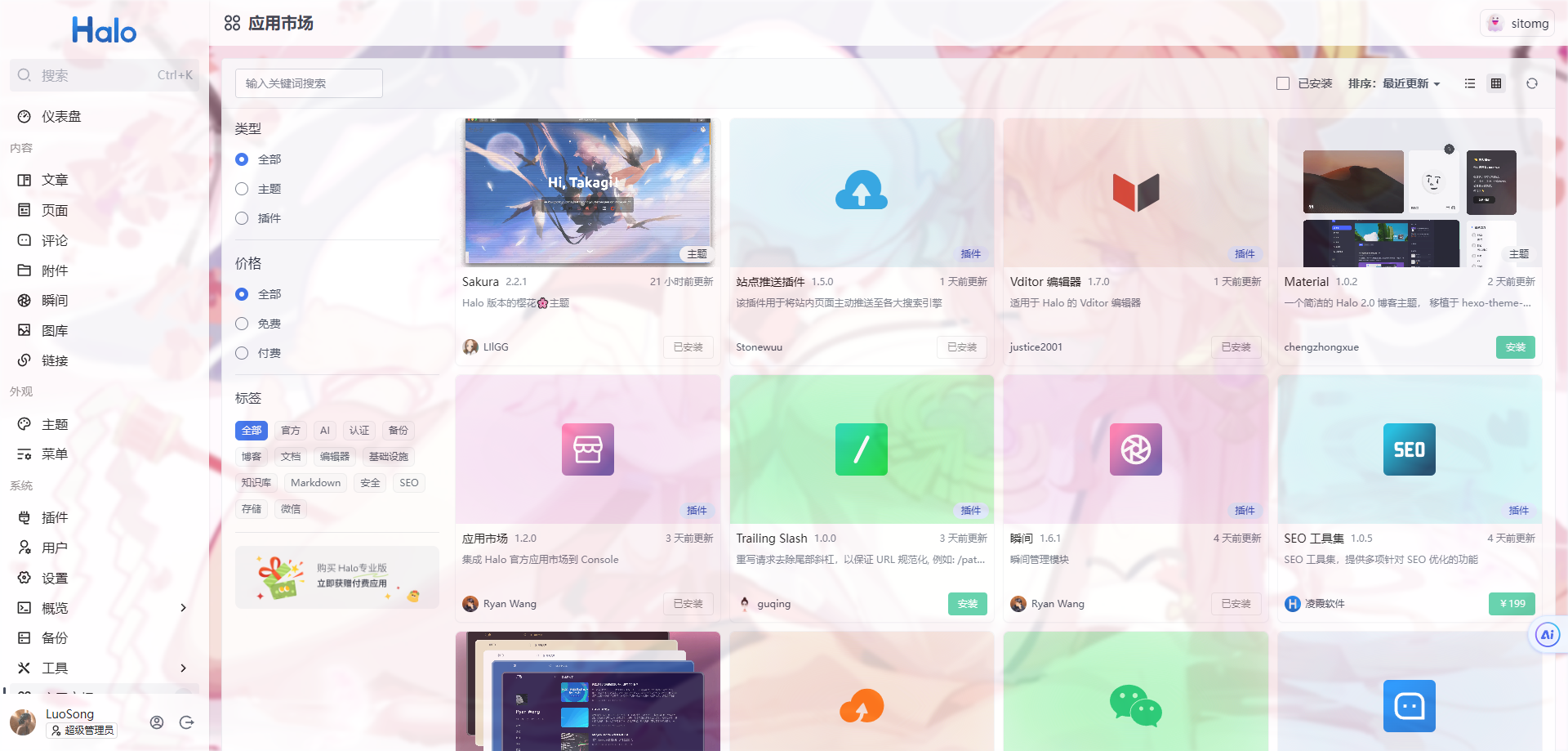
环境为docker部署,容器中没有vim编辑器,建议将index.html移动到容器卷然后在主机上修改,最后复制到容器下的文件目录下,缺点:每次更新都需要换文件...
效果如下:
cd /application/BOOT-INF/classes/console

vim index.html
<!DOCTYPE html>
<html>

<head>
  <meta charset="UTF-8" />
  <meta content="IE=edge" http-equiv="X-UA-Compatible" />
  <meta content="webkit" name="renderer" />
  <meta content="width=device-width, initial-scale=1, maximum-scale=1, user-scalable=no, viewport-fit=cover"
    name="viewport" />
  <meta content="noindex,nofollow" name="robots" />
  <title></title>
  <link rel="icon" href="/console/favicon.ico" type="image/png" />
  <link rel="icon" href="/console/favicon.ico" type="image/svg+xml" />
  <meta name="msapplication-TileColor" content="#da532c" />
  <meta name="theme-color" content="#ffffff" />
  <style>
    body {
      height: 100%;
      background-color: #f5f5f5;
    }

    #loader {
      position: absolute;
      top: 0;
      right: 0;
      bottom: 0;
      left: 0;
      margin: auto;
      border: solid 3px #e5e5e5;
      border-top-color: #333;
      border-radius: 50%;
      width: 30px;
      height: 30px;
      animation: spin 0.6s linear infinite;
    }

    @keyframes spin {
      to {
        transform: rotate(360deg);
      }
    }
  </style>
  <script src="/console/assets/vue/vue.global.57d0152b.js" type="text/javascript"></script>
  <script src="/console/assets/vue-router/vue-router.global.57d0152b.js" type="text/javascript"></script>
  <script src="/console/assets/vue-demi/vue-demi.57d0152b.js" type="text/javascript"></script>
  <script src="/console/assets/vueuse/vueuse.shared.iife.57d0152b.js" type="text/javascript"></script>
  <script src="/console/assets/vueuse/vueuse.core.iife.57d0152b.js" type="text/javascript"></script>
  <script src="/console/assets/vueuse/vueuse.components.iife.57d0152b.js" type="text/javascript"></script>
  <script src="/console/assets/vueuse/vueuse.router.iife.57d0152b.js" type="text/javascript"></script>
  <script src="/console/assets/components/halo-components.iife.57d0152b.js" type="text/javascript"></script>
  <script src="/console/assets/console-shared/halo-console-shared.iife.57d0152b.js" type="text/javascript"></script>
  <script src="/console/assets/richtext-editor/halo-rich-text-editor.iife.57d0152b.js" type="text/javascript"></script>
  <script type="module" crossorigin src="/console/assets/index-f4e77731.js"></script>
  <link rel="modulepreload" crossorigin href="/console/assets/vendor-8da49f84.js">
  <link rel="stylesheet" href="/console/assets/index-2dfc5a2f.css">
</head>
<!-- 定位 -->
<body style="position: relative;">
  <!-- 背景盒子 -->
  <div id="backgroundImage"></div>
  <noscript>
    <strong>
      We're sorry but halo console client doesn't work properly without
      JavaScript enabled. Please enable it to continue.
    </strong>
  </noscript>
  <!-- 全局透明度 -->
  <div id="app" style="opacity: 0.84;">
    <div id="loader"></div>
  </div>

  <script type="text/javascript">
    (function () {
      var imageListPc = ['https://www.youcats.cn/Pixiv/Honkai-Star-Rail/Robin.(Honkai.Star.Rail).full.4167492.jpg'];
      var imageListMobile = ['https://www.youcats.cn/Pixiv/Honkai-Star-Rail/Ruan.Mei.full.4101986.jpg'];
      var image = document.getElementById("backgroundImage");
      var url = location.href;
      if ((url.indexOf('www.youcats.cn') != -1 || url.indexOf('youcats.cn') != -1)) {
        if (navigator.userAgent.match(/(Android|webOS|iPhone|iPad|iPod|BlackBerry|IEMobile|Opera Mini|ios)/i)) {
          // 移动端
          image.setAttribute('style',
            `background-image: url('${imageListMobile[Math.floor(Math.random() * (imageListMobile.length - 0)) + 0]}'); position: fixed; top: 0; width: 100%; height: 100%; background-repeat: no-repeat; background-size: auto 100%; background-position: center 40%; filter: blur(2px); z-index: -1;`
          );
        } else {
          // Pc端
          image.setAttribute('style',
            `background-image: url('${imageListPc[Math.floor(Math.random() * (imageListPc.length - 0)) + 0]}'); position: fixed; top: 0; width: 100%; height: 100%; background-repeat: no-repeat; background-size: 100% auto; background-position: center 40%; filter: blur(2px); z-index: -1;`
          );
        }
      }
    })();
  </script>
</body>

</html>
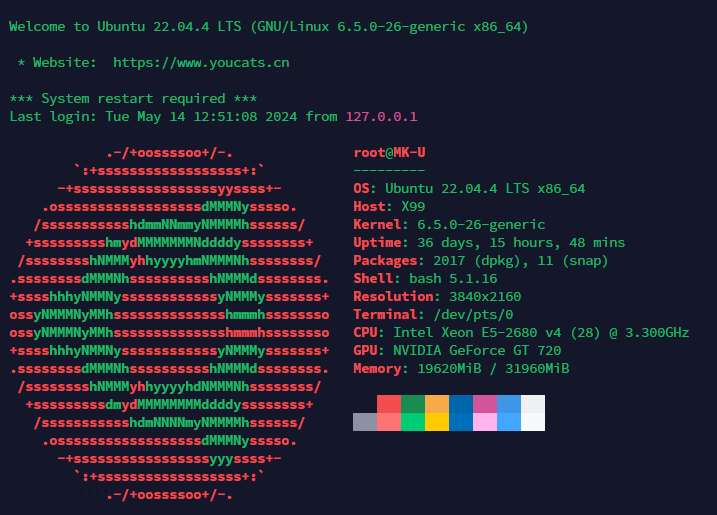
Ubuntu登录显示初始信息更改
cd /etc/profile.d/
vim neofetch.sh

#neofetch.sh内容,没有neofetch使用apt-get install neofetch即可
#/bin/bash
neofetch

cd /etc/update-motd.d/ #按需更改使用#注释即可
效果如下:
Halo2控制台设置背景
https://www.youcats.cn/archives/1715402965331
评论